Home / Putler alternatives

Ecommerce analytics buyer’s guide · 2026

The Best Putler Alternatives for Ecommerce (2026)

Seven options, sorted by the work they’re best suited to, from gateway reporting to full multichannel profit analytics.

14-day trial · No card needed · Or start with the Free plan

WooCommerceShopifyAmazonBigCommerceWalmart
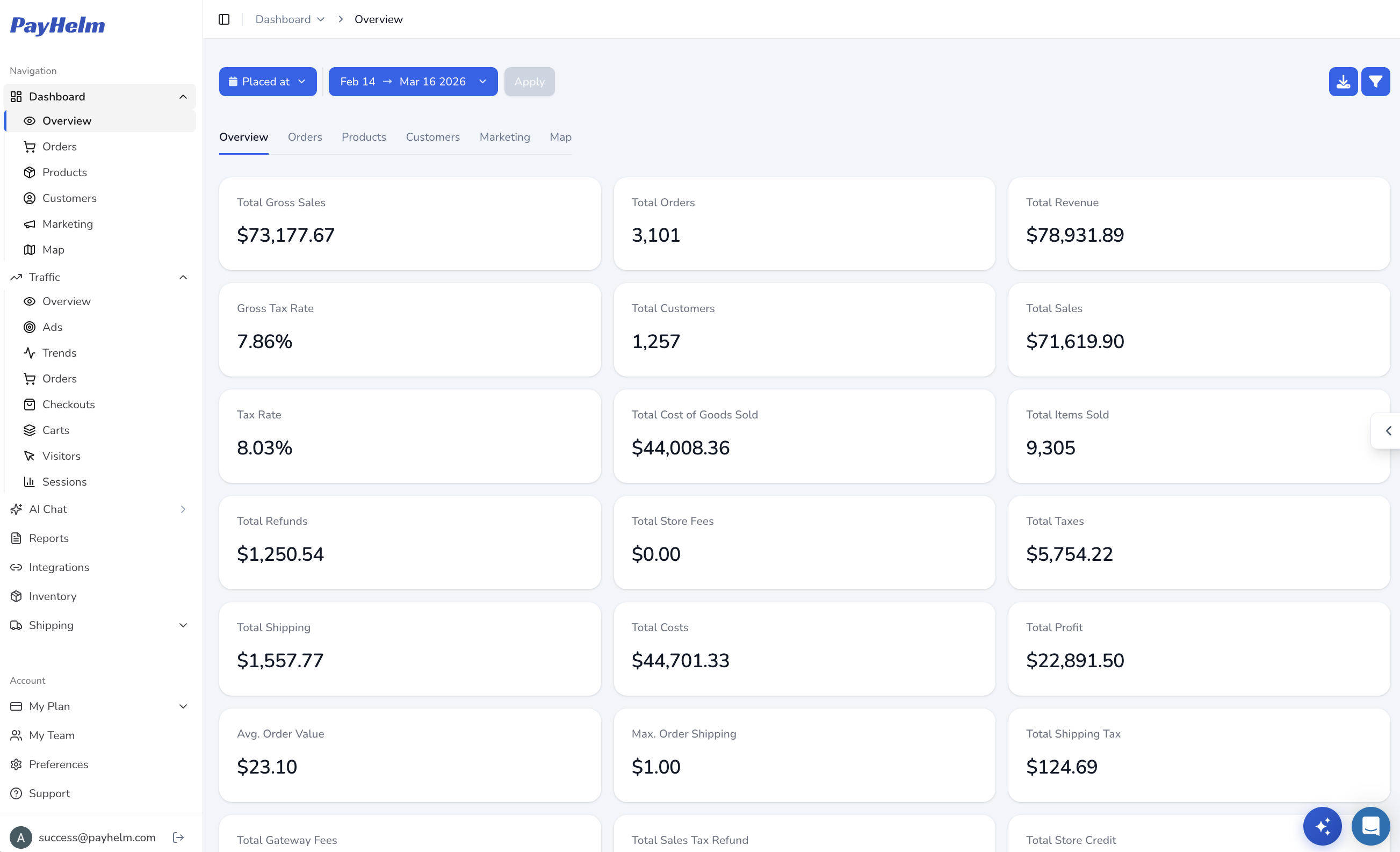
PayHelm analytics dashboard illustrating Putler alternatives: connected commerce performance, sales and profit reporting
Sales, ads and marketplaces in one report.Product view
Stores +
channels
The short version

PayHelm vs Putler: two different centers of gravity

Both products can be relevant to ecommerce reporting, but the decision often turns on data architecture, the channels that matter and the workflow after someone spots a change. Start by mapping those requirements, then compare the current product and package details.

PayHelm

Profit across stores, marketplaces and ad spend.

Connect supported storefronts, marketplaces and advertising accounts to compare sales with available costs and margin. PayHelm can bring Google and Meta reporting alongside commerce data, subject to connector access, and paid-plan AI features can support analysis where permitted.

Explore traffic and advertising analytics
Putler

One reconciled revenue view from gateways and stores.

Putler combines reporting from payment gateways and commerce sources, with tools for duplicate handling, currency conversion, refunds and subscriptions. Its plan information also describes unlimited data sources, email reports and integrations including Google Analytics and Mailchimp. It is a different center of gravity from a platform built around ad performance and marketplace profit.

Explore export and reporting tools

Reconciled revenue is valuable; the next question is what sits beside it

Putler is built around bringing revenue information from payment gateways and online stores into a consolidated view. That focus can be especially useful when a business has multiple payment processors, currencies, digital products or stores and wants to inspect customer and subscription activity together. Its pricing is based on tracked monthly revenue, so the amount should be compared at the business’s actual revenue band rather than treated as a flat subscription.

PayHelm’s emphasis extends into connected advertising, product and channel reporting. Sellers who want to look at Google or Meta spend alongside store sales, fees, shipping and available costs may value that wider profit context. PayHelm also supports marketplaces such as Amazon and Walmart. The reporting can only be as complete as the connector fields and cost records available, and the AI functions are subject to plan and permissions.

These roles can overlap without being identical. If the team issues refunds or manages subscriptions inside Putler, those operating tasks need an owner if the analytics subscription changes. A dashboard comparison should not become an accidental payment-operations migration. Verify any payment gateway integrations required for the destination, and keep the gateway or store as the authoritative place for payment actions unless a replacement workflow has been confirmed.

ComparePayHelmPutler
Best-fit use caseMultichannel sellers comparing profit after advertising, fees and shipping across stores and marketplaces.Stores and digital businesses that want a consolidated revenue view across payment gateways and commerce sources.
Pricing basisFree plan; Entrepreneur $20 per user/month; Business $100/month per $250K in monthly sales; Enterprise pricing is custom. Confirm current plan entitlements for the capabilities you need.Revenue-based tiers: $20/month up to $10K monthly revenue through $2,250/month for $3M–$5M; higher volumes are custom. Verify current tier.
Stores and marketplacesShopify, BigCommerce, WooCommerce, Wix, Amazon, Walmart, eBay and Etsy, subject to connector availability and the fields each source exposes.Supports store connections including WooCommerce, Shopify, BigCommerce, eBay and Etsy, alongside payment gateways. Confirm your sources.
Profit, COGS, fees and shippingProfit and margin reporting from connected sales and available cost inputs. Validate COGS, fees, shipping, refunds and other costs for your model.Revenue, customer, product and subscription analytics; confirm the exact COGS and margin depth required for your workflow.
AI insights and actionsPaid-plan AI access and connected actions depend on plan, permissions and configured tools. Do not assume identical entitlements across plans.Pricing information emphasizes proactive emailed insights; AI features are not asserted here without current plan documentation.
Advertising and email dataConnected advertising and email-marketing analytics, including Google and Meta sources; this is not a standalone email-sending service.Google Analytics and Mailchimp are listed among integrations; confirm whether required ad-platform metrics are available.
Custom reports and exportsCustom reports, dashboards and scheduled reports on Entrepreneur and above; confirm export destinations and delivery options for your plan.Weekly email reporting and drill-downs are available; Inbound API is listed and Outbound API may cost extra.
Attribution and trackingTraffic and advertising reporting based on connected source data; not a substitute for a dedicated first-party tracking pixel.Dedicated ad attribution is not listed as a primary pricing-page feature; verify any tracking requirement separately.
Payments and subscriptionsPayment and refund reporting through supported connected sources; verify gateway-specific fields and operational needs.Connects PayPal, Stripe, Braintree and 2Checkout; Putler describes refund and subscription management workflows.
Setup and switchingSelf-serve onboarding; a 14-day trial is available on eligible paid plans and a Free plan can be explored. Check current terms.14-day trial without a card is listed. Review revenue band, source coverage and any paid API needs.

Capabilities vary by plan, connector and package. Confirm the data fields, definitions and access you need before deciding.
Why sellers consider PayHelm

Three practical differences to evaluate

Use these as questions for a product walkthrough, not as a claim that another platform cannot solve the same problem. Test with your sources, definitions and reporting cadence.

01 / AD SPEND

Put media cost beside store outcomes.

Connect supported Google and Meta advertising sources to examine campaign performance alongside sales and available margin inputs. Reconcile windows, currencies and source totals before interpreting ROAS as profit; ad platform reporting and order-level cost accounting answer different questions.

Ask how each tool handles late-arriving orders, refunds and currency conversion so a month-end review remains explainable.

02 / MARKETPLACE MIX

Bring marketplaces into the same review.

For businesses selling on Amazon or Walmart as well as their own storefront, PayHelm can put those channels into a shared analytics workflow. Confirm fee and settlement coverage by connector; do not assume a summary sales figure contains every marketplace cost your finance model requires.

03 / CONNECTED AI

Move from report review to a question.

Paid-plan AI features can help users explore connected reporting and selected workflows, depending on permissions and plan. Putler’s pricing page highlights emailed insights, so compare the actual tasks your team wants automated rather than relying on the broad label of AI.

Browse product areas that may help answer the questions behind your comparison. Availability can vary by plan and connected source, so use these pages to narrow the evaluation rather than assume a feature is included in every tier.

Choose for the job in front of you

Seven Putler alternatives to evaluate

The tools below serve different needs. This short list is a starting point for building a shortlist around channel coverage, data architecture and daily workflow—not a ranking of overall quality.

01

PayHelm

Multichannel profit reporting with advertising data and connected AI.

Explore store, marketplace, advertising and operating data in one connected analytics workspace, then validate the reporting and permissions you need.

Consider: If gateway-level reconciliation and in-app refund actions are the core requirement, Putler is designed around that use case.

Explore PayHelm

Metorik

WooCommerce reporting and email workflows through Engage.

Baremetrics

Subscription analytics for recurring-revenue businesses.

Glew

Commerce BI, with managed warehouse functionality in Glew Plus.

Conjura

SKU-level margin and marketplace performance analysis.

Databox

KPI dashboards across connected business tools.

Lifetimely by AMP

Shopify profit and customer lifetime-value reporting.

Compare the model—not just the number

Putler pricing vs PayHelm

Price models measure different things. Compare the plan and package at your own volume, including the work and other tools required to get the reports you need.

PayHelm · Free$0

Unified dashboard · Profit and margin reports · 300+ metrics

Shopify, BigCommerce, WooCommerce and Amazon · 12-month lookback

Free plan; no card required.

PayHelm · Business$100 / month

Per $250K in monthly sales · Scheduled reports · Inventory

Traffic and advertising analytics · 1,000 AI credits per month

5+ years of history

Confirm current plan entitlements and sales-volume fit.

PayHelm · EnterpriseCustom

Custom pipelines · Sheets and Looker exports · SLA

Confirm the applicable scope, users, volume and support.

Custom pricing.

Putler prices by tracked monthly revenue and lists plans from $20 per month for up to $10,000 in monthly revenue through $2,250 per month at $3 million–$5 million, with custom pricing above that. Standard plans include unlimited data sources, and a 14-day trial without a card is listed. Check the current revenue band, billing terms and any paid API requirements; outbound API access may incur extra cost. Putler and PayHelm both scale with business size in different ways.

PayHelm’s Free, per-user Entrepreneur, sales-based Business and custom Enterprise tiers make a different bundle available at different scales. The meaningful question is what comes with the reporting: advertising sources, marketplace data, cost detail, payment operations and AI access. Compare both at your actual revenue and sales volume. Savings are not guaranteed; compare at your volume.

Savings are not guaranteed; compare at your volume. Plan contents and pricing can change, so confirm current terms with each provider.

A careful switch beats a rushed one

How to evaluate a move from Putler

Treat a move as a reporting validation project. Agree on which numbers should match, what can differ by definition, and which people need to approve the new workflow before any existing service is retired.

  1. Connect stores, marketplaces and ad accounts.Check payment, order and marketing source coverage, then verify that the destination receives the fields and historical period your reports require.
  2. Review refunds and currency treatment.Compare duplicate handling, exchange rates, refund dates and subscription events so that the same transaction is not counted differently.
  3. Run both tools over the same month.Use a complete period with a stable source list. Reconcile report definitions and confirm operational users can still complete payment tasks.
  4. Reconcile revenue before cancelling.Compare store and gateway totals, document any differences and confirm the owner of refunds, subscriptions and exports before ending the current plan.

Keep a small reconciliation record: source, date range, metric definition, known gaps and the person who approved it. That makes the cutover reversible if a connector or downstream report behaves differently than expected.

Before you decide

Putler alternatives: FAQs

What is the best Putler alternative?

The right option depends on what you need beyond a consolidated revenue view. PayHelm is worth evaluating for advertising data, marketplaces, available profit inputs and connected AI. Metorik may fit WooCommerce email workflows, while subscription analytics or dashboard products may better suit other jobs. Keep payment operations in view as you compare.

Is PayHelm cheaper than Putler?

Prices can be close at smaller business sizes, but the models differ. Putler charges by tracked monthly revenue, from $20 up to $10K monthly revenue to $2,250 at $3M–$5M, then custom. PayHelm uses user-based and sales-based tiers plus a Free plan. Compare the current band and included capabilities at your volume; savings are not guaranteed.

Does PayHelm connect to PayPal and Stripe?

PayHelm lists PayPal and Stripe reporting integrations. Check each integration’s available fields and account requirements for your reporting use case. Reporting connections should not be assumed to provide Putler-style operational actions such as initiating refunds or managing subscriptions.

Can PayHelm show ad spend and profit together?

PayHelm connects advertising reporting, including Google and Meta sources, with commerce data and available cost inputs. You can evaluate performance alongside margin, but results depend on connector fields, COGS, fees, shipping, refunds and aligned reporting windows. Validate the definitions before using a combined metric for budget decisions.

Does PayHelm report on Amazon and Walmart?

PayHelm supports Amazon and Walmart alongside storefront integrations. Confirm the account type, available history, fees and data fields needed for your reports. Marketplace data availability can differ from store data and should be checked before treating the combined view as a reconciled payout statement.

Can I import data from a source PayHelm does not connect to?

Custom imports and pipelines require review before they can be treated as supported. Enterprise teams can discuss custom pipeline needs, while the standard integrations page identifies available connections. Confirm file format, refresh frequency, field mapping and ongoing ownership rather than assuming any source can be imported automatically.

Bring your own questions

See revenue, ad spend and margin in one place.

Try PayHelm, connect the sources you need, and validate reporting against your business before making a change.

Start your free trial