Analyzing Customer Demographics and Gender-Based Purchasing Patterns
In this article
Analyzing Customer Demographics and Gender-Based Purchasing Patterns
PayHelm enables you to analyze customer behavior and purchasing patterns by demographic characteristics, including gender, to better understand your customer segments and optimize your marketing strategies.
Accessing Gender and Demographic Filters
Step 1: Navigate to Your Dashboard
- Log into your PayHelm account
- Click on Dashboard from the main navigation menu
- Ensure you have selected the appropriate date range for your analysis
Step 2: Access Demographic Filters
- Look for the Filters button in your dashboard (typically blue-colored)
- Click on Filters to open the filtering options
- In the filter panel, locate the Gender or demographic section
- Click on the Gender dropdown to see available options
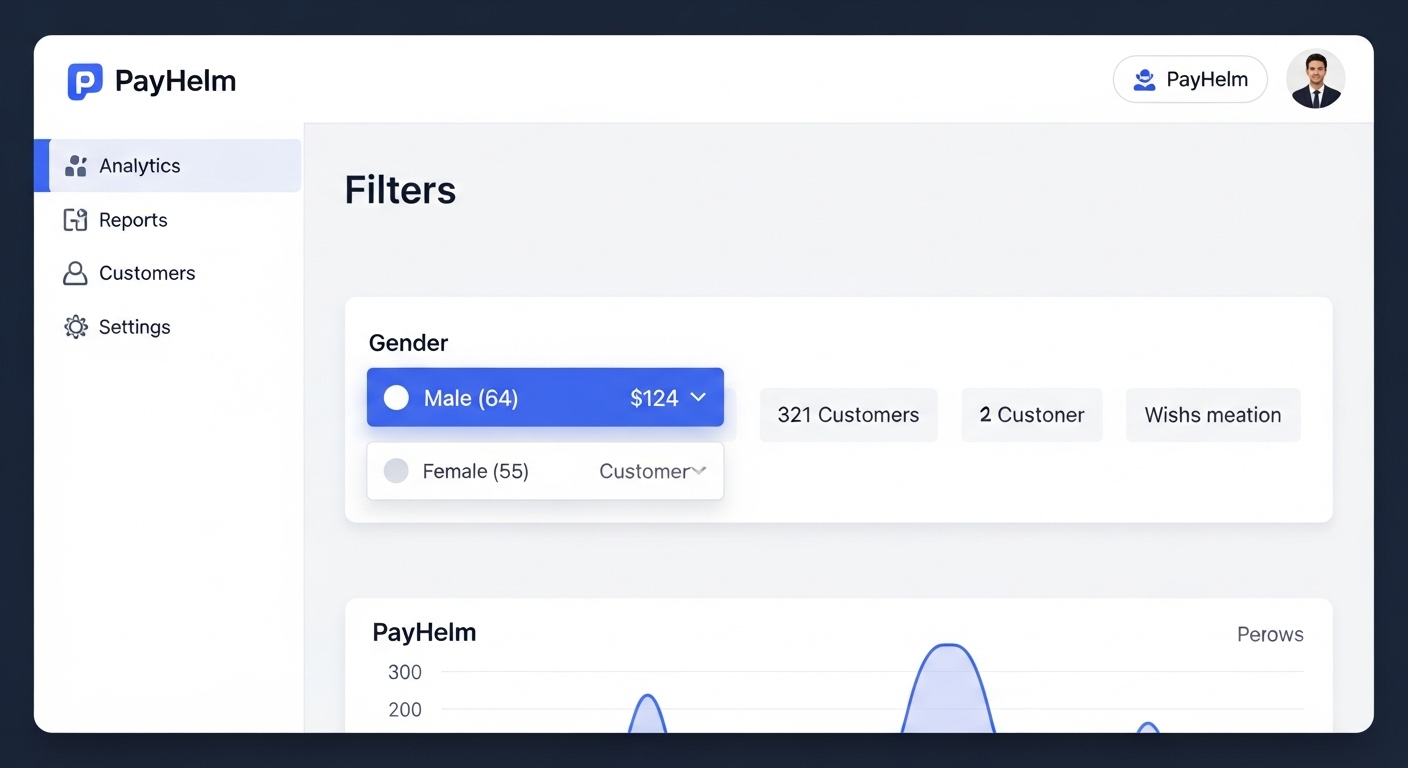
The gender filter interface in your PayHelm dashboard showing the Filters dropdown with gender options and customer counts.
Step 3: Apply Gender Filters
- Select specific genders to analyze (e.g., Male, Female)
- Numbers in parentheses show the count of customers in each category
- Click Apply or the filter will automatically update your dashboard
- Your dashboard metrics will now reflect data for the selected demographic segments
Understanding Your Demographic Data
Data Source and Accuracy
Important: Gender and demographic data in PayHelm comes directly from your customers' registration information, not artificial intelligence or automated assumptions.
Where This Data Originates:
- Customer Registration Forms: Data collected when customers create accounts on your ecommerce platform
- Checkout Information: Details provided during the purchase process
- Profile Updates: Information customers add or modify in their account profiles
- Platform Integration: Synchronized from your ecommerce platform (Shopify, BigCommerce, WooCommerce, etc.)
Data Reliability Considerations
- Voluntary Information: Customers choose whether to provide demographic details
- Self-Reported: All demographic data is customer-provided, not estimated
- Platform Dependent: Availability depends on your ecommerce platform's form fields
- Privacy Compliant: Only displays data customers have willingly shared
Analyzing Gender-Based Purchasing Patterns
Key Metrics to Review
Once you've applied gender filters, analyze these important metrics:
Revenue Analysis:
- Total revenue by gender segment
- Average order value differences between genders
- Repeat purchase rates by demographic
- Seasonal purchasing patterns
Product Performance:
- Top-selling products for each gender
- Category preferences by demographic
- Price point preferences
- Brand performance across segments
Customer Behavior:
- Shopping frequency patterns
- Cart abandonment rates by gender
- Customer lifetime value variations
- Engagement with marketing campaigns
Creating Actionable Insights
For Marketing Strategies:
- Targeted Campaigns: Create gender-specific marketing messages
- Product Positioning: Highlight products that resonate with specific demographics
- Email Segmentation: Customize email content based on demographic preferences
- Social Media Strategy: Tailor social content to demographic interests
For Inventory Management:
- Stock Planning: Adjust inventory based on demographic demand patterns
- Seasonal Buying: Plan seasonal stock levels by demographic preferences
- New Product Development: Identify gaps in demographic-specific offerings
For Customer Experience:
- Website Personalization: Customize user experience based on demographic data
- Product Recommendations: Improve recommendation algorithms with demographic insights
- Customer Service: Train staff on demographic-specific preferences and concerns
Setting Up Better Demographic Data Collection
Optimizing Your Registration Forms
To improve the quality and quantity of demographic data:
On Your Ecommerce Platform:
- Review Registration Forms: Ensure gender/demographic fields are present but optional
- Incentivize Completion: Offer small discounts for completing profile information
- Clear Privacy Policy: Explain how demographic data will be used
- Mobile Optimization: Ensure forms work well on mobile devices
Best Practices:
- Make demographic fields optional to reduce registration friction
- Use inclusive language and options (consider "Prefer not to say" options)
- Clearly communicate the benefits of providing this information
- Regularly review and update demographic field options
Integration Considerations
Platform-Specific Notes:
- Shopify: Enable customer accounts and customize registration forms
- BigCommerce: Configure customer registration fields in store settings
- WooCommerce: Use plugins to add demographic fields to registration
- Etsy: Limited demographic data available through platform integration
Troubleshooting Common Issues
Missing Demographic Data
If you don't see gender options or data:
- Check Platform Settings: Verify demographic fields are enabled in your ecommerce platform
- Review Integration: Ensure PayHelm is properly connected to your store
- Data Sync: Allow 24-48 hours for new demographic data to appear
- Customer Accounts: Verify customers are creating accounts (not just guest checkouts)
Limited Demographic Information
If demographic data seems incomplete:
- Historical Data: Older customers may not have provided demographic information
- Guest Checkouts: Customers who don't create accounts won't have demographic data
- Privacy Settings: Some customers may choose not to provide this information
- Platform Limitations: Some platforms collect limited demographic data
Data Accuracy Concerns
To improve data quality:
- Regular Updates: Encourage customers to keep profiles current
- Validation: Use platform tools to validate demographic information
- Segmentation: Focus on customers with complete demographic profiles for accurate analysis
- Sample Size: Ensure sufficient data before making business decisions
Compliance and Privacy Considerations
Data Protection
- GDPR Compliance: Ensure demographic data collection complies with privacy regulations
- Customer Consent: Only use data customers have explicitly provided
- Data Security: PayHelm maintains enterprise-grade security for all customer data
- Transparency: Be clear about how demographic data is used for analysis
Ethical Use
- Non-Discriminatory: Use demographic insights to improve customer experience, not to discriminate
- Inclusive Marketing: Ensure marketing materials are inclusive and respectful
- Privacy Respect: Honor customer preferences regarding data sharing and use
Advanced Demographic Analysis
Combining Demographics with Other Metrics
Create more sophisticated analyses by combining gender data with:
- Geographic Location: Regional preferences by demographic
- Age Groups: Cross-demographic analysis when age data is available
- Purchase History: Long-term behavior patterns by demographic
- Marketing Attribution: Campaign effectiveness by demographic segment
Export and Reporting
- Custom Reports: Export demographic-filtered data for detailed analysis
- Regular Monitoring: Set up regular reviews of demographic trends
- Stakeholder Sharing: Create executive summaries of demographic insights
- Integration: Connect demographic insights with your CRM or marketing tools
Need Additional Help?
If you need assistance setting up demographic data collection on your ecommerce platform or have questions about interpreting your demographic analysis, our support team can provide platform-specific guidance and best practices for your business.
Related Articles
Custom Metric Builder
Build any KPI you need using PayHelm's Custom Metric Builder — combine revenue, orders, spend, and more into calculated metrics you can use across every report.
Understanding Dual Commission Reports: Commission vs Sales Tracking
Learn why PayHelm uses two separate commission reports and how each serves a distinct purpose in tracking commission payments versus sales performance for comprehensive sales team management.
Calculate Average Inventory Turns and Time on Shelf
Measure how quickly your inventory sells with inventory turnover metrics and time on shelf analysis to optimize purchasing and identify slow-moving products.
Automate with PayHelm AI
Let an AI agent handle these tasks for you — automatically, on a schedule.
Monitor Inventory Risk for Promoted or Seasonal Products
Make sure the products you're actively promoting are going to be in stock when customers arrive.
Optimize Amazon Product Titles, Bullets, and Backend Terms
Rank higher on Amazon A9 with AI-optimized listing content refreshed every week.
Identify Refund, Chargeback, or Return Spikes by Source/Product
Catch quality problems and fraud patterns before they become expensive trends.
From the PayHelm Blog
Insights and guides to help you grow your ecommerce business.
May Product Release: Elevating Your Experience
In May, we're sharing remarkable updates designed to take your user experience to the next level with pre-configured reports and seamless integrations.
Stop Wasting $1000s on Wrong Attribution: The Real-Time Ecommerce Reporting Guide
Every month, thousands of ecommerce businesses unknowingly throw money down the drain because their attribution models are broken. Learn how to fix your attribution and stop wasting ad spend.
Shopify Analytics vs BigCommerce Analytics vs WooCommerce Analytics: Which Platform Gives You the Real Story?
Choosing the right ecommerce platform isn't just about design flexibility or payment processing—it's about getting the analytics that actually help you grow your business. Compare Shopify, BigCommerce, and WooCommerce analytics capabilities.